
On the child's main page you will find all the options to interact and manage the child's phone.
Please see description below picture.
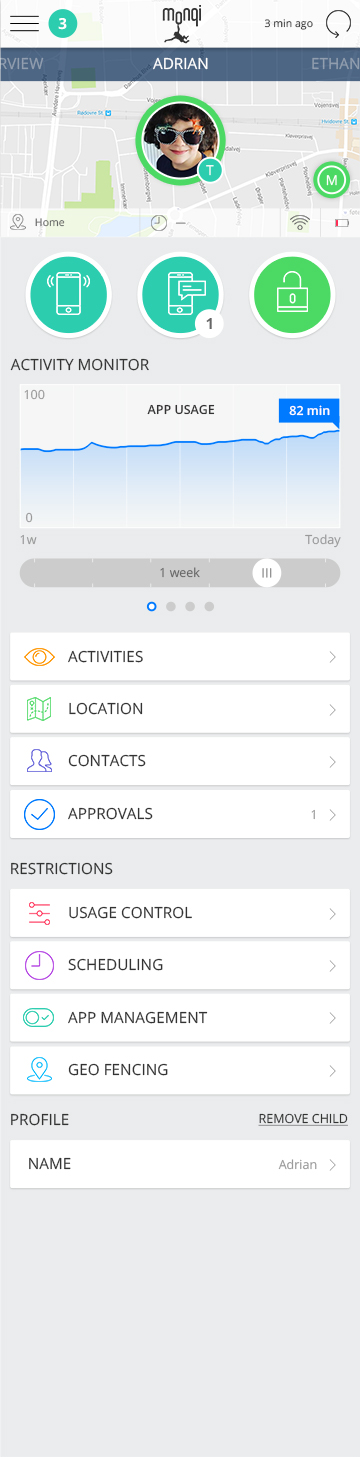
ACTIVITIES
In activities provides a chronological overview of the activities your child has been undertaking on his/her phone. This includes app activities and downloads, calls/sms, Geo-fence notifications, and contact additions
LOCATION:
In location you can see where Activities took place over time and by choosing LIVE MOVEMENT you will be able to see your child’s phone movements in real time.
CONTACTS:
In contacts you can view or edit your child’s contacts. You can also add contacts from your own contact book.
APPROVALS:
If you have any un-actioned approvals you will find them here: Contact approvals, and App approvals.
USAGE MANAGEMENT
In USAGE MANAGEMENT you manage the overall settings on your child’s phone. Set overall app limits; manage SMS, CALLs and Mobile Data. This will allow you to manage the cost of your child’s usage.
SCHEDULING
With SCHEDULING you can tailor your child’s monqi phone for various occasions. You can decide, what days and time of day it should be active and within your chosen time make apps available and select if your child should be able to SMS/CALL their friends. Do not worry – they will always be able to get a hold of you.
APP MANAGEMENT
In APP MANAGEMENT you can determine 1) if you child should have access to an app 2) If you decide it should be available set the amount of time they should be able to use it.
NAME
In Name you can change the phone number of your child if they decide to change SIM
REQUEST UNLOCK CODE
If your child has set up a pin lock and have forgotten it you can press REQUEST UNLOCK CODE which will give you an unlock code that you enter on your child’s phone. Once the code has been used on the child’s phone they will need generate a new code on their phone
Comments
0 comments
Please sign in to leave a comment.